Dashboard
Your personalized command center. See what matters most, right when you log in.
Overview
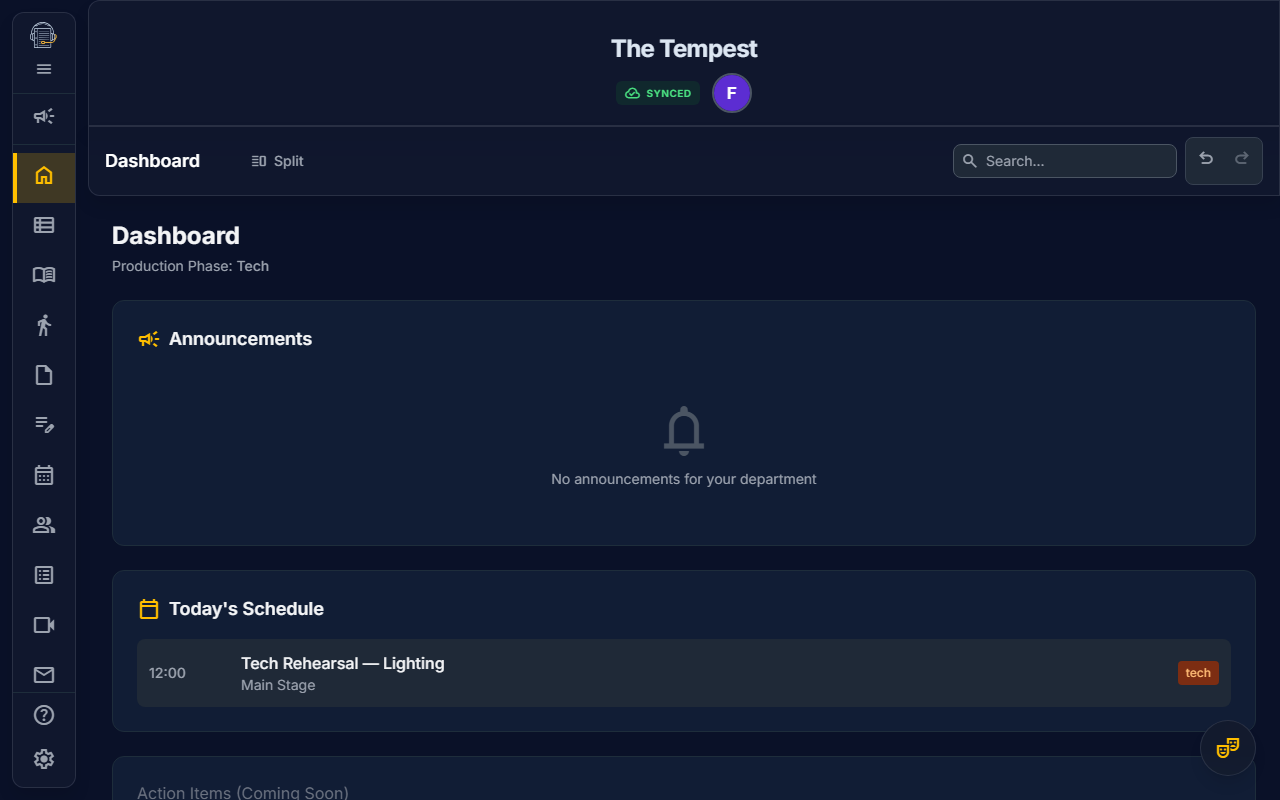
The Dashboard is your personalized landing page that adapts to your role and the current production phase. Instead of hunting through multiple tools, the Dashboard surfaces the most relevant information for you, right now.
Key Features
Personalized for Your Role
The Dashboard shows different content based on your workspace:
| Role | You'll See |
|---|---|
| Cast Member | Your upcoming calls (next 48 hours), announcements for Cast, production feed highlights |
| Stage Manager | Today's full schedule, announcements for Stage Management, quick action shortcuts |
| Props Master | Props-related announcements, your daily schedule |
| Director | Production overview, rehearsal progress, announcements |
| Sound Designer | Sound department announcements, upcoming tech schedules |
My Calls Widget
Never miss your call again.
The "My Calls" widget shows only the schedule events that involve you personally:
- Events assigned to you directly
- Events for groups you belong to (Cast, Crew, etc.)
- Limited to the next 48 hours for at-a-glance convenience
Each event displays:
- Event title and type (rehearsal, meeting, tech, performance)
- Date and time
- Location
- Character/role if applicable
Announcements Widget
Stay informed with what matters to you.
The Announcements widget shows:
- Pinned Posts — Important announcements pinned by production staff (amber highlight)
- @Department Mentions — Posts that @mention your department (blue highlight)
Everyone automatically sees:
- All @Announcement mentions (production-wide notices)
- Posts tagged for their specific departments (e.g., @Props, @Cast, @Stage Management)
Daily Schedule Widget
Today at a glance.
Stage Managers and production staff see the full schedule for today:
- All events sorted by time
- Event type indicators
- Location information
- Quick navigation to full scheduler
Attendance Widget
Who's here today?
Stage Managers see today's attendance summary during rehearsal, tech, and performance phases:
- Present / Late / Missing counts at a glance
- Visual progress bar showing check-in completion
- Tap the widget to jump directly to the Attendance view
Getting Started Wizard (Stage Managers)
Your first visit? We'll help you set up.
If you're the Stage Manager opening a project for the first time, a Getting Started Wizard appears above the Dashboard:
- Import Script — Upload your script (PDF) to auto-generate acts, scenes, characters, props, and sound cues
- Invite Team — Search your organization's roster by name and select team members to invite, or enter email addresses manually
Once complete, click Done to dismiss the wizard. It's stored per-project, so you'll see it for each new production but never again for a show you've already set up.
Welcome Card (Collaborators)
A warm hello on your first visit.
When you join a project as a collaborator (actor, designer, crew), you'll see a one-time Welcome Card above the Dashboard:
- Your role badge and the show title so you know you're in the right place
- Quick tips to help you get started (check your calls, explore the Feed, update your profile)
- Click Got It to dismiss — the card won't return
Production Phases
The Dashboard intelligently adapts based on where you are in the production timeline:
| Phase | When | Dashboard Focus |
|---|---|---|
| Pre-Production | No rehearsals scheduled yet | Planning widgets, quick actions |
| Rehearsal | Active rehearsal period | Calls, daily schedule, rehearsal progress |
| Tech | Tech week (first tech event approaches) | Tech schedules, props checklists |
| Performance | Show is running | Performance schedules, quick contacts |
| Archival | After final performance | Production summary, archive options |
Accessing the Dashboard
- Default Landing: The Dashboard is the first thing you see after logging in
- Sidebar: Click the Home icon in the sidebar
- Keyboard: Press
Alt + 1to jump to Dashboard (when not in a text field)
Department Mentions
When creating Feed posts, you can @mention departments to target specific teams:
@Announcement— Everyone sees this (production-wide)@Cast— Cast members@Props— Props team@Sound— Sound designers@Costumes— Costume department@Stage Management— Stage managers@Director— Directors and assistants@Choreography— Choreographers@Scenery— Set designers and crew@Lighting— Lighting designers@Music— Musical directors@Attendance— Attendance coordinators
Tips for Success
- Check your Dashboard daily — It surfaces what you need to know
- Use @Announcement for urgent news — Ensures everyone sees it
- Pin important posts — They stay at the top of the Announcements widget
- Use department mentions — Target the right people without spamming everyone
The Dashboard adapts to you, so you can focus on your craft.