On Book Pro — Features
Transform your production workflow. One platform. Every tool. Real-time collaboration.
Built for Theatre Professionals
On Book Pro is the all-in-one production management platform designed specifically for Stage Managers, Directors, and Production Teams. Say goodbye to scattered spreadsheets, lost notes, and communication chaos.
Workspaces & Split View
Your tools, your way.
On Book Pro organizes its 20+ tools into workspaces — themed collections named after theatrical spaces. Switch between workspaces to focus on what matters for your current task:
| Workspace | Who It's For | Key Tools |
|---|---|---|
| Rehearsal Room | Stage Managers | Prompt Book, Blocking, Notes, Schedule |
| Wardrobe | Costume Designers | Costumes, Budget, Personnel |
| Workshop | Props Masters | Props, Budget, Run Sheet |
| Sound Booth | Sound Designers | Sound, Run Sheet, Scenes |
| emoji_objects Light Lab | Lighting Designers | Lighting, Prompt Book, Scenes |
| Creative Suite | Directors | Blocking, Notes, Scenes, Video |
| Production Office | Production Managers | Production, Budget, Schedule, Email |
| Green Room | Cast Members | Dashboard, Schedule, Feed |
| Backstage | Power Users | All tools accessible |
Split View Mode
Click Split in the toolbar to view two tools side-by-side:
- Your current tool stays on the left panel
- A tool picker opens on the right — choose any tool from your workspace
- Your choice is remembered for next time (e.g., splitting from Run Sheet always opens Notes)
Some workspaces offer smart defaults — for example, splitting from the Prompt Book in Rehearsal Room automatically suggests Notes on the right.
Resize Panels: Drag the divider between panels to adjust proportions. Your layout is remembered between sessions.
Panel Focus: Click a panel to make it active — the toolbar title updates to show which tool is focused.
emoji_objects Split View is available on screens 1024px and wider. On tablets and phones, tools display one at a time.
Core Features
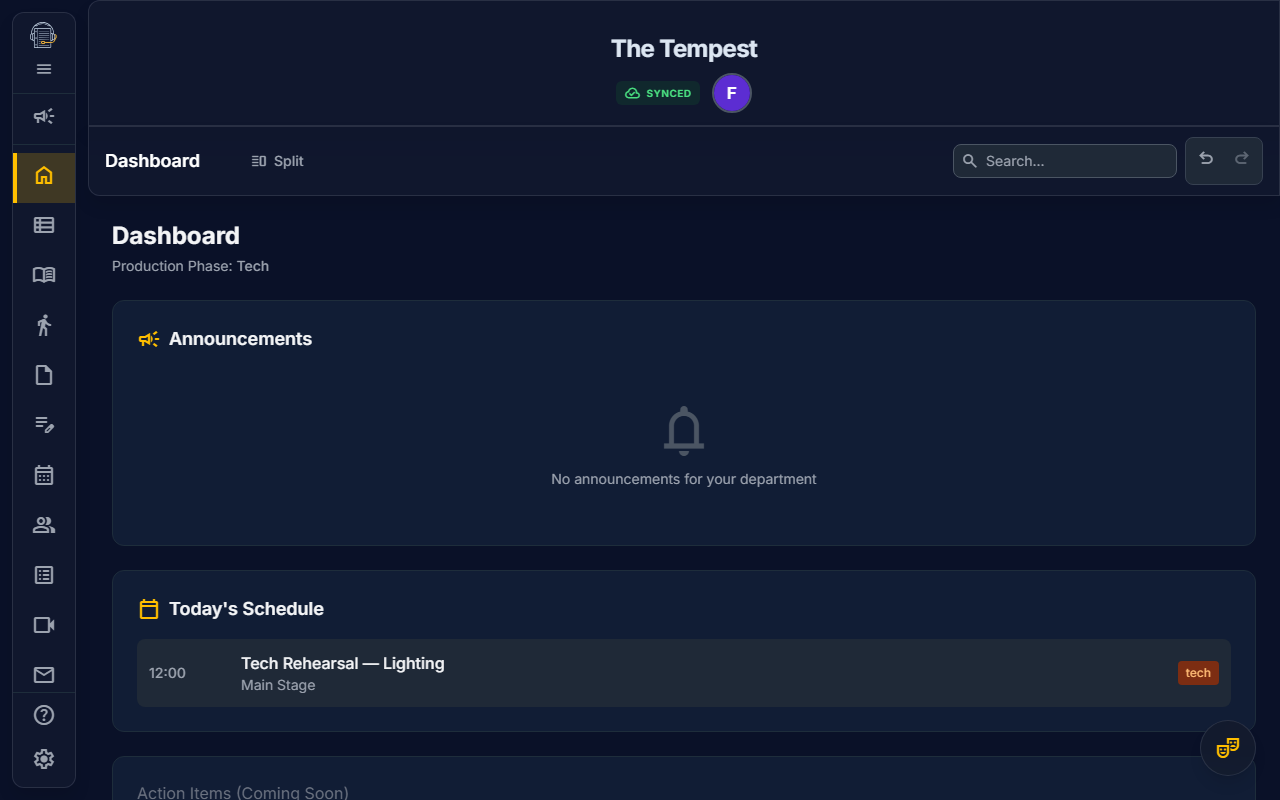
Dashboard
Your personalized command center.
- Role-Based Widgets: See content tailored to your workspace (Cast, Stage Manager, Director, etc.)
- My Calls: Personalized schedule showing only your events for the next 48 hours
- Announcements: Pinned posts and @department mentions relevant to you
- Daily Schedule: Today's full schedule at a glance (for production staff)
- Phase-Aware: Dashboard adapts based on production phase (Pre-Production → Rehearsal → Tech → Performance)
- @Announcement Mentions: Tag posts for everyone in the production
"Log in. See what matters. Get to work."
First-Run Onboarding
Start strong. No guesswork.
When you first join a project, On Book Pro meets you where you are:
- Stage Managers see a Getting Started Wizard — import your script and invite your team in two quick steps
- Collaborators see a Welcome Card — a one-time greeting showing your role, the show title, and quick-start tips
- Contextual Empty States — every major tool (Show Structure, Props, Costumes, Notes, Blocking) shows actionable guidance instead of blank pages. Click to import a script, add items, or navigate to setup
Once you've completed or dismissed the wizard, it never returns — your Dashboard becomes your command center.
Show Structure & AI Import
Organize your production's backbone in minutes.
- Define Acts and Scenes with intuitive drag-and-drop reordering
- Link Characters to specific scenes for instant cast breakdowns
- AI Script Analysis: Upload your PDF script and let our AI automatically extract:
- Scene structure with act assignments
- Character names and appearances
- Props mentioned in stage directions
- Sound cues from the script
"Upload your script. Watch your show structure build itself."
Personnel Directory
Your entire company, beautifully organized.
- Visual Card Grid: Browse cast and crew with avatars, role badges, and quick actions
- View Modes: Switch between Grid View for browsing and List View for editing
- Category Filters: Filter by Cast, Crew, or Production with one click
- Quick Contact: Email and phone links directly on each card
- Self-Service Onboarding: Add personnel with just a name and email—they complete their own profile
- URL-Based Filters: Share filtered views with teammates via URL
- Full Accessibility: Complete keyboard navigation support
Personnel Cards Display:
- Avatar with headshot or initials fallback
- Name and role/character assignments
- Color-coded category badges (Cast, Crew, Production)
- Department head and account link indicators
Additional Personnel Features:
- Emergency Information: Quick access to emergency contacts when you need them
- Custom Tracking Matrix: Create columns for any requirement—bios, headshots, waivers, measurements
- Attendance Tracking: Real-time check-in system with late detection — see dedicated guide
- Self-Service QR Sign-In: Actors scan a QR code to sign in — no account required
- Printable Reports: Generate paper-ready contact sheets and tracking matrices
Attendance Tracking
Know who's here. Act on who's not.
- QR Code Sign-In: Generate a QR code or shareable link for actors to self-check-in on their phones
- Fullscreen Projection: One-click projector mode for check-in stations at the rehearsal door
- Server-Side Late Detection: Sign-ins are validated server-side with a 30-minute window — Present or Late, no clock tricks
- SM Roster View: Urgency-sorted actor list (Missing first) with status badges, sign-in times, and manual override
- Summary Cards: Present / Late / Missing / Excused counts at a glance
- Dashboard Widget: "Today's Attendance" progress card during rehearsal, tech, and performance phases
- Quick Contact: Call or email missing actors directly from the roster
- No Account Required: Actors sign in via token — no On Book Pro login needed
→ Learn more about Attendance Tracking
Rehearsal Scheduler
Plan smarter. Rehearse better.
- Visual Calendar: Drag scenes and acts directly onto dates
- Event Types: Rehearsals, Meetings, Tech, Performances, and Deadlines with unique styling
- Rehearsal Segments: Create custom rehearsal blocks with specific character assignments
- Conflict Detection: Instantly see which actors have scheduling conflicts
- AEA Compliance Checker: Built-in contract compliance verification
- LORT Rules: 12-hour turnaround, 8-hour daily max, 36-hour weekly rest
- NEAT Rules: 10-hour turnaround, 7-hour daily max, 34-hour weekly rest
- External Calendar Sync: Subscribe to a "smart feed" in Google/Apple/Outlook that shows only your relevant calls
- Template System: Reusable rehearsal templates for recurring patterns
Costumes Module
Professional costume management from measurements to quick changes.
- 31-Point Measurements: Comprehensive anatomical tracking per actor
- Upper body: bust/chest, waist, hips, neck, shoulder, bicep, arm length, wrist
- Lower body: inseam, outseam, thigh, height
- Sizing: shirt, pants, shoe, hat, glove, dress, jacket
- Allergy tracking and special notes
- Costume Pieces: Full inventory with:
- Scene and character assignments
- Source tracking (stock, purchased, rental, borrowed, built)
- Status workflow (TBD → To Build/Buy → Ready to Fit → Complete)
- Image uploads for reference
- Quick Changes: Specialized tracking for fast costume changes
- Duration timing in seconds
- Location assignment (Stage Left, Quick Change Booth, etc.)
- Dresser assignments
- Urgency visualization for changes under 30 seconds
- Fittings Log: Document fitting sessions with dates, attendees, and notes
- Budget Tracking: Per-piece estimated and actual costs with receipt uploads
- Maintenance Tab: Track items needing repair or laundry
Budget Dashboard
Production-wide financial visibility and management.
- Analytics Tab: Real-time financial overview
- Summary Cards: Estimated cost, actual spent, variance, rental count
- Tab Switcher: View Costumes or Props budget separately
- Grouped Tables: Sort by Status, Character, or Source
- Rental Returns: Dedicated section with overdue highlighting
- Budget Setup Tab (Production Managers only):
- Configure project-wide budget allocations
- Set total costume and props budgets
- Real-time comparison of allocated vs actual spending
- Color-coded health indicators (over budget, at risk, on track)
- Project-wide currency configuration
- Permission-Based Access:
- Analytics view: Stage Managers, Designers, Production Managers, and Owners
- Budget Setup: Production Managers and Owners only
Production Management
Your production command center for deadlines and analytics.
- Dashboard Analytics: Real-time production health overview
- Summary metrics: Total, Pending, Met, Missed, Overdue deadlines
- Completion progress bars with success rate tracking
- Department breakdown cards with per-department metrics
- Budget health integration from Costumes and Props modules
- Deadline Management: Create and track production milestones
- Full CRUD operations (create, edit, delete)
- Department and personnel assignment
- Status workflow: Pending → Met/Missed
- Ping notifications for deadline reminders
- Overdue detection with visual warnings
- Professional Reports: Print-ready deadline documentation
- Summary statistics (5 key metrics)
- Comprehensive deadline table sorted by due date
- Department breakdown with completion percentages
- Color-coded status indicators
- Role-Based Access: Production Managers, Stage Managers, and Owners
Notes & Rich Text Collaboration
Document every moment. Share instantly.
- Rich Text Editor: Full formatting with bold, italic, lists, headings, and more
- Real-Time Collaboration: Multiple users edit the same note simultaneously
- Report Templates: One-click generation of:
- Rehearsal Reports
- Meeting Notes
- Quick Timestamps: Insert timestamps with a keyboard shortcut
- Stopwatch Timer: Built-in rehearsal timer with start/pause/reset controls. Insert timer marks to log elapsed time at key moments.
- Floating Editor: Detach your editor window for multi-tasking
- Wiki Links: Reference other notes and project elements
Set Builder
Design your stage. Scale to reality.
- 2D Canvas: Top-down view of your stage with professional drafting aesthetics
- Real-World Scaling: Calibrate your floorplan—draw a reference line, enter the real measurement, and everything scales automatically
- Asset Library: Drag-and-drop furniture, platforms, and architectural elements
- AI Asset Generation: Describe what you need ("blue victorian sofa") and our AI generates a properly-scaled SVG icon
- Floorplan Import: Upload your theater's groundplan as a background
- Set Baking: Save configurations for reuse across scenes
Blocking Tracker
Capture movement. Communicate clearly.
- Scene-Linked Sets: Automatically loads the correct stage layout for each scene
- Path Drawing: Draw smooth actor movement paths with intuitive curve tools
- Choreography Mode: Separate layer for dance and movement sequences
- Multi-Actor Filtering: Solo or combine character paths for clarity
- Event List: Reorderable movement events with visibility toggles
- Responsive Design: Collapsible side panels for mobile-friendly blocking on tablets
Props Management
Track every item. Know where it goes.
- Comprehensive Inventory: Name, type, and detailed notes for every prop
- Movement Tracking: Entrance and exit assignments (Stage Left, Stage Right, etc.)
- Scene Linking: Associate props with specific scenes
- Character Assignment: Know who handles what
- Source Tracking: Stock, purchased, rental, borrowed, or built
- Budget Tracking: Estimated and actual costs with receipt support
- Maintenance Tab: Track items needing repair or cleaning
- AI Extraction: Script import automatically identifies props from stage directions
- Batch Operations: Multi-select and bulk delete for efficient cleanup
- Print Optimization: Professional prop tables ready for production books
The Run Sheet
Your master document. Production-ready.
- Flat Data Architecture: Handles hundreds of cues without slowing down
- Comprehensive Columns: Scene #, Moment, Set/Strike, Set Piece, Location, Who, Notes
- Excel-Like Navigation: Arrow keys and Tab for rapid data entry
- Clipboard Paste: Tab-separated data imports directly into rows
- Print Ready: Optimized layouts for production binders
Sound Tab
Your rehearsal soundscape, organized.
- Interactive Soundboard: Grid-based pads for instant playback of common SFX
- Freesound Integration: Search and download Creative Commons audio directly
- Waveform Trimmer: Visual editor for setting start and end points
- Sound Cues Table: Theatrical cue list with custom numbering (SQ 14, Q10)
- Master Controls: Volume, loop settings, and "Stop All" panic button
- Offline Support: Cached audio plays without internet
Social Feed
Keep everyone in the loop.
- Threaded Conversations: Create topics with subject lines and initial posts
- Rich Media Support: Attach photos, videos, audio clips, and blocking snapshots
- User Tagging: @mention team members for notifications
- Real-Time Updates: New posts appear instantly for all collaborators
- Notification Badge: Unread count indicator in sidebar (numeric or dot when collapsed)
- Chronological History: Complete record of production communications
Video Chat
Remote rehearsals and production meetings, built right in.
- Embedded Video Conferencing: Powered by Daily.co for built-in video conferencing
- Specialized Layouts:
- Meeting: Screen share focus with floating participant bubbles
- One-on-One: Equal side-by-side panels for intimate conversations
- Table Read: 60/40 split for script viewing alongside video grid
- Rehearsal: Minimal video strip to maximize workspace
- Lobby (Hair Check): Preview camera, select devices, test mic levels before joining
- Real-Time Mic Visualizer: See your audio input levels to ensure you're heard
- Role-Based Permissions: Stage Managers can start meetings; all members can join
- Transcript Capture: Meeting transcripts saved automatically (video not stored)
My Profile
Personal settings and preferences at your fingertips.
- Profile Modal: Click your avatar in the header to access your profile
- Editable Fields: Phone, emergency contact, bio, and allergies/notes
- Synced to Personnel: Profile edits automatically update your linked personnel record
- Character Assignments: View your assigned characters (read-only, managed by SM)
- User Preferences: Theme toggle (light/dark), email notification toggle, and keyboard shortcuts display
- Logout: Sign out conveniently from your profile modal
Communications & Email
Production-quality email distribution — manual and automatic.
- Email Tab: Quick action cards for Call Sheets, Deadline Reminders, Project Invitations, and Announcements
- Feature-Page Emails: Send Rehearsal Reports and Line Notes directly from the Notes page
- 7 Manual Email Types: Call Sheet, Rehearsal Report, Line Notes, Deadline Ping, Meeting Invitation, Project Invite, Custom Announcement
- 5 Automated Notifications: Welcome emails, schedule change alerts, deadline reminders, @mention notifications, and profile completion reminders
- Email History: Track all sent emails with delivery counts and status indicators
- Production-First Branding: Your show's identity leads every email; On Book Pro is the stagehand in the footer
- Notification Preferences: Opt out of automated emails from My Profile (manual SM emails always deliver)
→ Learn more about Communications
Cloud Sync & Collaboration
Work together. From anywhere.
- Real-Time Sync: Changes appear instantly across all devices
- Presence Indicators: See who's online and actively editing
- Invite Collaborators: Generate share links directly from the Admin Portal's Members page
- Role-Based Access: Owner, Stage Manager, Designer, Actor, and Crew roles
- Granular Permissions: 15+ individual permissions for fine-grained control
- Manual Personnel Linking: Link users to personnel records when auto-link fails
- Conflict Resolution: Graceful handling of simultaneous edits
Print System
Professional documents, every time.
- View-Specific Layouts: Optimized formatting for:
- Run Sheets
- Props Lists
- Contact Directories
- Rehearsal Schedules (Calendar & List views)
- Blocking Diagrams
- Tracking Matrices
- Call Sheets
- Sign-In Sheets
- Costume Bible (Cover, TOC, Measurements, Plot, Character Breakdown, Budget, Receipts)
- Quick Change Plot (Statistics, Change Table, Dresser Assignments)
- Production Deadlines (Summary Statistics, Deadline Table, Department Breakdown)
- Section Toggles: Enable/disable sections for custom output
- Logo Placement: Show and theater logos in headers
- Font Size & Density: Adjust print density for different needs
- Clean Pagination: Proper page breaks and professional formatting
Offline PWA
Your production, even without WiFi.
- Full Offline Functionality: Create, edit, and manage your show without internet
- Automatic Sync: Changes upload when connection restores
- Installable App: Add to home screen on any device
- Local Persistence: Your data is always saved locally
- Background Sync: Updates sync automatically in the background
Platform Support
| Platform | Support |
|---|---|
| Chrome / Edge | ✅ Full Support |
| Firefox | ✅ Full Support |
| Safari | ✅ Full Support |
| iOS Safari | ✅ PWA Installable |
| Android Chrome | ✅ PWA Installable |
| Desktop Install | ✅ Available |
Ready to Transform Your Production?
On Book Pro brings together everything you need to manage a theatrical production—from first read-through to final curtain.
One platform. Every tool. Real-time collaboration.
Copyright © 2026 Adam C. Alderson. All Rights Reserved.