Communications & Email
Review before sending. Check all manual emails before sending them to the team.
Overview
On Book Pro's Communications system provides production-quality email distribution powered by Postmark. Send professional correspondence branded with your production's identity, and let the system handle routine notifications automatically.
Email Tab
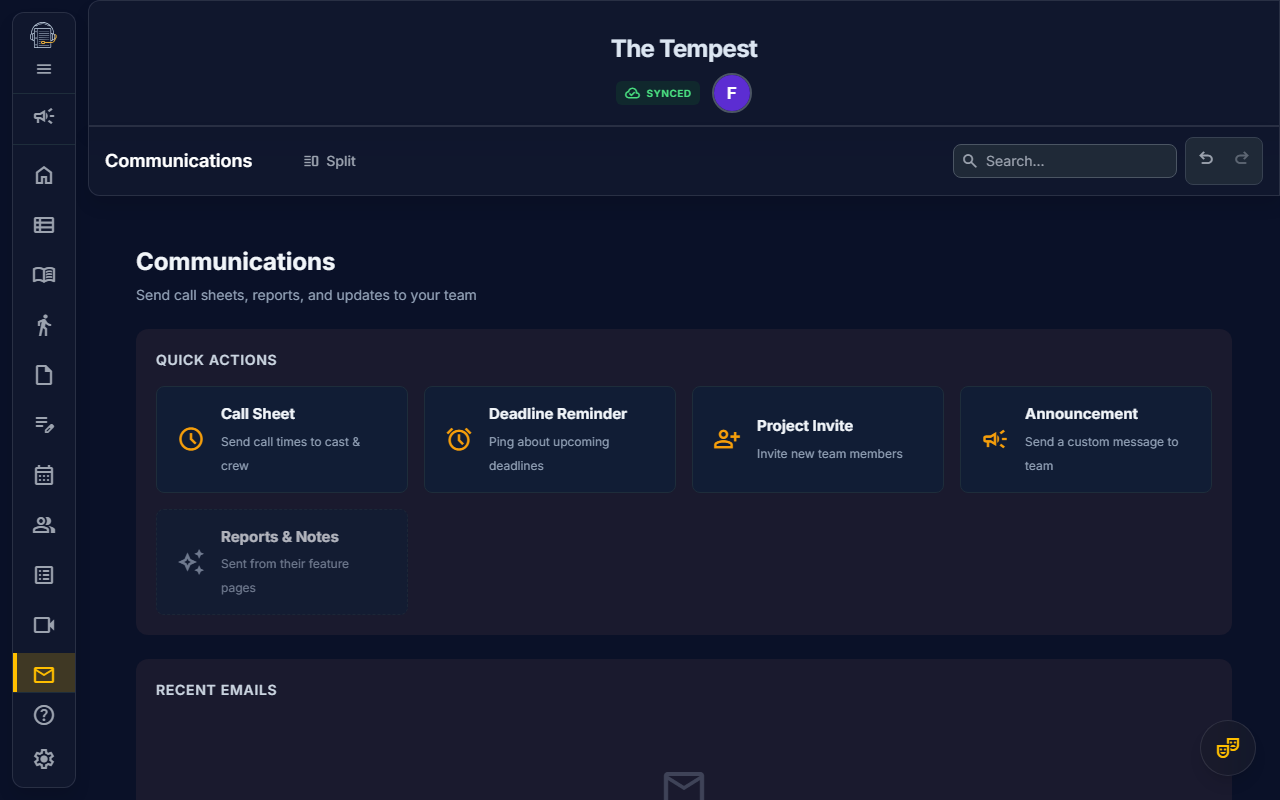
Access email features from the Communications tab in your production workspace.
Built-in Owners, Stage Managers, Production Managers, and Assistant Stage Managers can send production emails. Audience management and communications settings still require communications-management authority.
Call Sheet Digest
Projects can enable a nightly Call Sheet Digest from the Communications tab. The digest uses the project communication time zone, a saved send time, and the call sheet audience rules to send a next-day call summary when eligible calls and deliverable recipients exist.
The digest panel shows whether the digest is enabled, its scheduled local send time, and the last run or last sent status. Possible outcomes include sent, skipped because there were no calls, skipped because there were no recipients, or failed.
If a recipient is called for the next day and their Personnel record already has a known conflict on that call date, the digest includes a notice explaining that the conflict is on file. The notice is informational; stage management should still review the schedule and call list when the conflict needs an explicit decision.
Quick Actions
| Card | Purpose |
|---|---|
| Call Sheet | Send daily call times to cast and crew |
| Deadline Ping | Remind team members about upcoming deadlines |
| Project Invite | Invite new members to the production |
| Announcement | Send custom messages to the entire team |
These are the visible manual cards in the Communications tab. Meeting or calendar invitation behavior may appear from scheduling workflows, but it is not a separate manual email card in this tab.
Audience Management
Users who can manage communications also see Audience Management in the Communications tab. Audiences are reusable recipient groups that report and email workflows can resolve before sending.
Default standing audiences include:
| Audience | Rule |
|---|---|
| Cast | Cast personnel |
| Production Team | Production personnel plus crew department heads |
| Stage Management | Personnel in the stage-management department |
| Design Team | Crew department heads |
Each audience shows deliverable recipients, contacts missing email addresses, and excluded recipients. You can:
- Add project contacts as manual includes
- Exclude project contacts from a standing audience
- Restore excluded contacts
- Add external recipients by email address, one per line or separated by commas/semicolons
- Save audience changes to the active cloud project
External recipients support either plain email addresses or Name <email@example.com> formatting. Saved audiences are project-specific; open the correct cloud project before saving changes.
For larger productions, the review surfaces compact repeated recipient rows and preserve app-user status badges so you can scan deliverable, missing-email, excluded, and external recipients without losing the send summary.
Feature-Page Emails
Some emails are sent directly from their feature pages:
- Rehearsal Reports — From the Notes page after generating a rehearsal report
- Line Notes — From the Line Notes view via the Send Reports action
Line Notes require script text access.
Rehearsal and meeting reports open a review step before sending or posting. The review shows selected audiences, deliverable recipients, missing-email contacts, and suppressed recipients. You can remove recipients for the current send, add a one-off external recipient, print the report, save it without sending, post a hosted report, copy a link for an already posted report, or send the report email.
Rehearsal and meeting report emails include a hosted report link when a shareable report artifact is available. The email keeps the quick summary and next-call details compact, while the hosted report preserves the fuller report body for recipients who need the complete printable version. Posting a report stores durable publication metadata on the note, so the report link can be regenerated later without resending email.
Manual Email Review
Call Sheets and Announcements also open an audience review before sending. The review uses the active project audience settings, shows who is deliverable, flags contacts missing email addresses, and records one-send removals or one-off external recipients with the delivery.
For Call Sheets, link the send to a schedule call when possible. Linked calls can resolve called recipients from the selected event, alongside the standing audiences you choose. If there is no linked call, you can still send to standing audiences and external recipients.
Announcements use the Announcement defaults from Audience Management. You can change standing audiences for that send, remove recipients, or add external recipients before sending.
Announcements can also include an optional CTA link. Choose None for a message-only announcement, or route recipients to a project destination such as Dashboard, Calendar, Scheduler, Production, Notes, Line Notes, Feed, Files, Personnel, Show Structure, Action Items, or Profile.
Deadline Pings use the same review pattern. When linked to a production deadline, the review can include the contextual Deadline Department audience alongside standing audiences and external recipients. If the send is not linked to a deadline, the review keeps contextual deadline recipients disabled and sends only to the standing or external recipients you choose.
While a manual send is in progress, Communications disables the composer controls and changes the send button to a sending state. Keep the composer open until the success or error toast appears so the recipient snapshot and delivery history can finish recording cleanly.
Automated Notifications
On Book Pro automatically sends notifications for important production events. No action required from Stage Managers — these happen in the background.
Welcome Email
When a new team member joins your production, they automatically receive a welcome email with:
- Production name and their assigned role
- Getting-started guidance
- A direct link to the production workspace
Schedule Change Alert
When someone modifies a rehearsal event's date, time, or location, all attendees of that event are automatically notified with:
- The name of the changed event
- A summary of what changed (e.g., "Date: Mon Feb 10 → Tue Feb 11")
- Updated event details
Deadline Reminder
Every morning at 9:00 AM ET, the system scans for pending deadlines due within 48 hours and sends reminders to assigned team members. Includes urgency indicators:
- Overdue — Past the due date
- Due Today — Deadline is today
- Due Tomorrow — 24 hours remaining
Profile Reminder
Every Monday at 10:00 AM ET, the system checks for team members with incomplete profiles and sends a friendly reminder listing the missing fields:
- Phone Number
- Email Address
- Emergency Contact & Phone
- Allergies / Medical Notes
@Mention Notification
When someone @mentions you in a feed post or comment, you receive an email with:
- Who mentioned you
- A preview of what they said
- A link to view the full post in the feed
Email Preferences
You can opt out of automated notifications from your profile:
- Open Settings from the sidebar
- Choose the Profile subtab
- Toggle Email Notifications off
Important
Opting out only affects automated notifications. Manual emails from your Stage Manager (Call Sheets, Announcements, etc.) will always be delivered to ensure critical production information reaches everyone.
Email History
Stage Managers can view a history of all sent emails in the Communications tab:
- Template icon and label for quick identification
- Delivery counts (e.g., "12/15 delivered")
- Audience summary for reviewed sends, such as Production Team, Called Recipients, or Deadline Department
- Search, type, status, and sort controls for narrowing the loaded recent history
- Pagination so busy productions can scan recent communication batches without one long list
- Status indicators — ✅ All delivered, ⚠️ Partial, ❌ Failed
- "Auto" badge — Distinguishes system-sent notifications from manual emails
- Recipient detail rows — Expand a history item to see recipient email, status, source labels, delivery/open timing, or latest issue
- Timestamp for each send
Recipient statuses can include intended, accepted, delivered, opened, suppressed, bounced, spam complaint, or failed. When a suppressed, bounced, or complained recipient has an active roster issue, authorized users can open that roster issue from the history row.
Sent project-invite records are cleared from the outbound queue after delivery, so resent or retried invitations should not leave stale queued-send rows behind.
Branding
All emails follow the Production-First design philosophy:
- Your production logo and show title appear prominently in the header
- On Book Pro branding is minimal, appearing only in the footer as a "Powered by" badge
- Consistent Prussian blue header with amber call-to-action buttons
- Professional formatting suitable for any production environment
Last updated: June 28, 2026